






Performance Optimization Tips
Web performance isn’t just about speed—it’s about delivering exceptional user experiences. In this comprehensive guide, we’ll explore practical techniques for optimizing your websites from Core Web Vitals to advanced optimization strategies.
Core Web Vitals
Google’s Core Web Vitals measure user-centric performance:
Largest Contentful Paint (LCP)
Target: < 2.5 seconds
LCP measures loading performance. To improve it:
<!-- Preload critical resources -->
<link rel="preload" as="image" href="hero.jpg" />

<!-- Use responsive images -->
<img
  src="hero-small.jpg"
  srcset="hero-small.jpg 400w, hero-medium.jpg 800w, hero-large.jpg 1200w"
  sizes="(max-width: 600px) 400px, (max-width: 1200px) 800px, 1200px"
  alt="Hero image"
/>
First Input Delay (FID) / Interaction to Next Paint (INP)
Target: < 100ms (FID), < 200ms (INP)
Optimize JavaScript execution:
// Bad: Blocking main thread
for (let i = 0; i < 1000000; i++) {
  processItem(i);
}

// Good: Break up work
async function processInChunks() {
  for (let i = 0; i < 1000000; i += 1000) {
    await scheduler.yield(); // New API
    for (let j = i; j < Math.min(i + 1000, 1000000); j++) {
      processItem(j);
    }
  }
}
Cumulative Layout Shift (CLS)
Target: < 0.1
Reserve space for dynamic content:
/* Reserve space for images */
.image-container {
  aspect-ratio: 16 / 9;
}

/* Use content-visibility for off-screen content */
.below-fold {
  content-visibility: auto;
  contain-intrinsic-size: 0 500px;
}
Resource Optimization
Image Optimization
Modern image formats offer significant savings:
<picture>
  <source type="image/avif" srcset="image.avif" />
  <source type="image/webp" srcset="image.webp" />
  <img src="image.jpg" alt="Optimized image" loading="lazy" />
</picture>
Font Optimization
Optimize font loading for better performance:
@font-face {
  font-family: "Custom Font";
  src: url("font.woff2") format("woff2");
  font-display: swap; /* Prevent invisible text */
  font-weight: 400;
  unicode-range: U+0000-00FF; /* Latin subset */
}
JavaScript Optimization
Code Splitting
Split your bundles for faster initial loads:
// Dynamic imports
const module = await import("./heavy-module.js");

// Route-based splitting (SvelteKit)
export const load = async () => {
  const { HeavyComponent } =
    await import("$lib/components/HeavyComponent.svelte");
  return { HeavyComponent };
};
Tree Shaking
Ensure your bundler can eliminate dead code:
// Bad: Imports everything
import _ from "lodash";

// Good: Import only what you need
import debounce from "lodash/debounce";
Caching Strategies
HTTP Caching
Implement effective cache headers:
# Static assets
Cache-Control: public, max-age=31536000, immutable

# HTML
Cache-Control: public, max-age=0, must-revalidate

# API responses
Cache-Control: public, max-age=60, stale-while-revalidate=30
Service Workers
Implement offline-first strategies:
self.addEventListener("fetch", (event) => {
  event.respondWith(
    caches.match(event.request).then((response) => {
      if (response) {
        return response; // Serve from cache
      }
      return fetch(event.request).then((response) => {
        // Cache new responses
        return caches.open("v1").then((cache) => {
          cache.put(event.request, response.clone());
          return response;
        });
      });
    }),
  );
});
Network Optimization
HTTP/2 and HTTP/3
Leverage modern protocols:
- HTTP/2: Multiplexing, server push
- HTTP/3: QUIC protocol, faster connection establishment
Resource Hints
Help the browser prioritize resources:
<!-- DNS prefetch -->
<link rel="dns-prefetch" href="https://api.example.com" />

<!-- Preconnect -->
<link rel="preconnect" href="https://fonts.googleapis.com" />

<!-- Prefetch -->
<link rel="prefetch" href="/next-page.html" />

<!-- Preload -->
<link rel="preload" href="critical.css" as="style" />
Monitoring and Measurement
Lighthouse
Automate performance audits:
npm install -g lighthouse
lighthouse https://example.com --view
Real User Monitoring (RUM)
Track actual user experiences:
// Web Vitals library
import { getCLS, getFID, getLCP } from "web-vitals";

getCLS(console.log);
getFID(console.log);
getLCP(console.log);
Advanced Techniques
Edge Computing
Move computation closer to users:
// Cloudflare Workers example
export default {
  async fetch(request) {
    const cache = caches.default;
    let response = await cache.match(request);

    if (!response) {
      response = await fetch(request);
      await cache.put(request, response.clone());
    }

    return response;
  },
};
Streaming SSR
Stream HTML as it’s generated:
// SvelteKit streaming
export const load = async () => {
  return {
    streamed: {
      slowData: getSlowData(), // Promise that resolves later
    },
  };
};
Performance Budget
Set and enforce performance budgets:
{
  "budgets": [
    {
      "path": "/*",
      "resourceSizes": [
        { "resourceType": "script", "budget": 170 },
        { "resourceType": "total", "budget": 500 }
      ]
    }
  ]
}
Conclusion
Web performance is an ongoing journey, not a destination. By implementing these techniques and continuously measuring your progress, you can deliver fast, responsive experiences that delight your users.
Remember: Every millisecond counts!
Browser support snapshot
Live support matrix for loading-lazy-attr from
Can I Use.
Show static fallback image
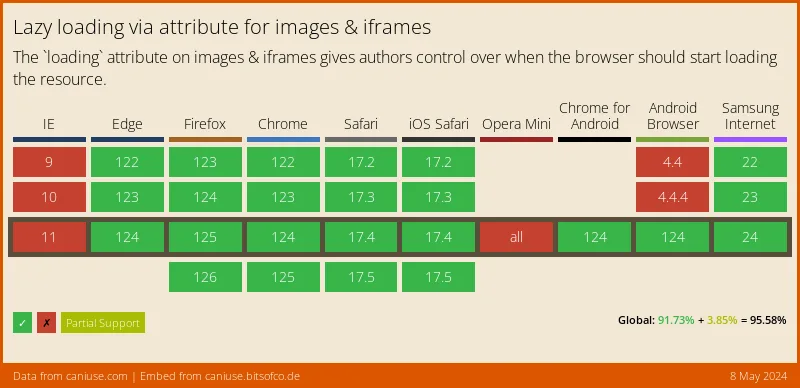
Source: caniuse.com




