







The CSS :has() Selector: Parent Selection Finally Arrives
For years, developers have dreamed of a “parent selector” in CSS. The :has() pseudo-class makes this dream a reality, fundamentally changing how we write CSS.
What is :has()?
The :has() pseudo-class selects elements based on what’s inside them. It’s essentially a parent selector, but it’s actually much more powerful than that.
/* Select a card that contains an image */
.card:has(img) {
  display: grid;
  grid-template-columns: 200px 1fr;
}

/* Select a form that has invalid inputs */
form:has(:invalid) {
  border: 2px solid red;
}
Why It’s Revolutionary
Before :has(), you couldn’t style a parent based on its children without JavaScript. Now you can create intelligent, context-aware styles purely in CSS.
Practical Use Cases
1. Conditional Card Layouts
/* Card with image gets a horizontal layout */
.card:has(img) {
  display: grid;
  grid-template-columns: 200px 1fr;
  gap: 1rem;
}

/* Card without image stays vertical */
.card {
  display: grid;
  gap: 1rem;
}
2. Form Validation Feedback
/* Highlight the entire form when it has errors */
form:has(:invalid) {
  outline: 2px solid hsl(0 100% 50%);
}

/* Show success state when all fields are valid */
form:has(input:not(:placeholder-shown)):not(:has(:invalid)) {
  outline: 2px solid hsl(120 100% 40%);
}
3. Navigation Active States
/* Highlight nav item when its submenu is open */
nav li:has(ul:hover) > a {
  background: var(--accent);
  color: white;
}
4. Article Figures
/* Add extra spacing to articles that contain figures */
article:has(figure) {
  max-width: 1200px;
}

/* Regular articles without figures */
article {
  max-width: 720px;
}
Advanced Techniques
Quantity Queries
You can combine :has() with sibling selectors for quantity queries:
/* Style when there are exactly 3 items */
li:first-child:nth-last-child(3),
li:first-child:nth-last-child(3) ~ li {
  /* styles for 3 items */
}

/* With :has(), it's cleaner */
ul:has(li:nth-child(3):last-child) li {
  width: calc(100% / 3);
}
Chaining :has()
/* Card with both an image AND a video */
.card:has(img):has(video) {
  aspect-ratio: 16 / 9;
}
Negation
/* Cards that DON'T have images */
.card:not(:has(img)) {
  padding: 2rem;
}
Interactive Example
Here’s a practical example with form validation:
/* Base field group styles */
.field-group {
  position: relative;
  margin-block: 1rem;
}

/* Show error icon when field is invalid */
.field-group:has(:invalid:not(:placeholder-shown)) {
  --status-color: hsl(0 100% 50%);
}

/* Show success icon when field is valid */
.field-group:has(:valid:not(:placeholder-shown)) {
  --status-color: hsl(120 100% 40%);
}

.field-group::after {
  content: '';
  position: absolute;
  right: 1rem;
  top: 50%;
  width: 20px;
  height: 20px;
  background: var(--status-color);
  border-radius: 50%;
  opacity: var(--status-color, 0) ? 1 : 0;
}
Browser Support
:has() is supported in all modern browsers:
- Chrome/Edge: ✅ v105+ (August 2022)
- Firefox: ✅ v121+ (December 2023)
- Safari: ✅ v15.4+ (March 2022)
Support is now at ~90% global usage, making it production-ready for most projects.
Performance Considerations
While :has() is powerful, it can be performance-intensive since the browser must watch for DOM changes. Follow these guidelines:
- Be specific: Use
:has()on targeted selectors, not universal ones - Avoid deep nesting:
div:has(div:has(div))is expensive - Test performance: Use browser DevTools to check rendering performance
/* ❌ Expensive - checks every element */
*:has(.active) {
  /* ... */
}

/* ✅ Better - scoped to specific elements */
.nav-item:has(.active) {
  /* ... */
}
Progressive Enhancement
For older browsers, use @supports:
/* Fallback layout */
.card {
  display: block;
}

/* Enhanced layout for browsers with :has() */
@supports selector(:has(*)) {
  .card:has(img) {
    display: grid;
    grid-template-columns: 200px 1fr;
  }
}
Combining with Other Modern Features
:has() pairs beautifully with container queries:
@container (min-width: 400px) {
  .card:has(img) {
    grid-template-columns: 1fr 1fr;
  }
}
Common Pitfalls
1. Specificity Confusion
/* This won't work as expected */
.card:has(> img) {
  /* Direct child only */
}

/* This checks descendants */
.card:has(img) {
  /* Any descendant */
}
2. Forgetting :not(:placeholder-shown)
For inputs, you often want to wait until the user has entered something:
/* ❌ Shows validation immediately */
input:invalid {
  border-color: red;
}

/* ✅ Only shows after user types */
input:invalid:not(:placeholder-shown) {
  border-color: red;
}
Real-World Example: Smart Grid
.grid {
  display: grid;
  gap: 2rem;
}

/* Auto-adjust columns based on children count */
.grid:has(> :nth-child(2):last-child) {
  grid-template-columns: 1fr 1fr;
}

.grid:has(> :nth-child(3):last-child) {
  grid-template-columns: repeat(3, 1fr);
}

.grid:has(> :nth-child(4):last-child) {
  grid-template-columns: repeat(2, 1fr);
}

.grid:has(> :nth-child(n + 5)) {
  grid-template-columns: repeat(auto-fit, minmax(250px, 1fr));
}
Conclusion
The :has() selector is one of the most significant additions to CSS in recent years. It eliminates countless JavaScript workarounds and enables genuinely intelligent, context-aware styling.
Start using it today for progressive enhancement, and watch how it simplifies your CSS architecture.
Browser support snapshot
Live support matrix for css-has from
Can I Use.
Show static fallback image
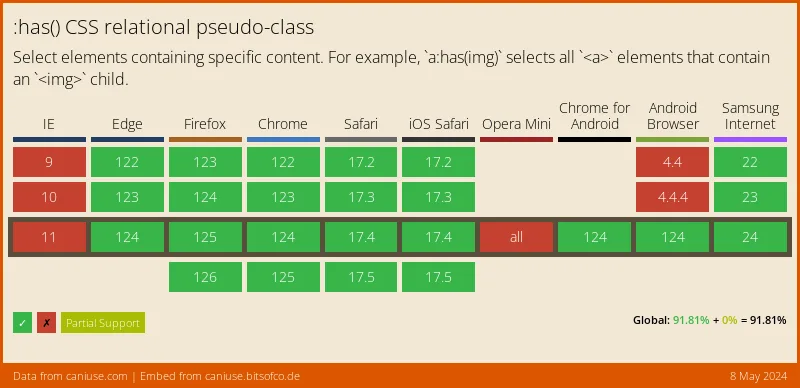
Source: caniuse.com




